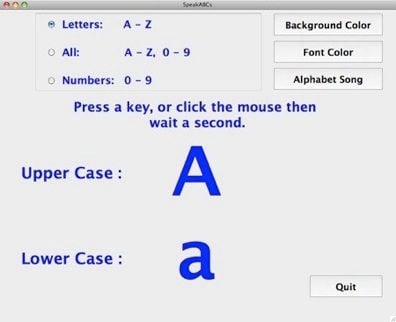
Description:
SpeakABCs is a simple program that teaches children their ABCs. When the child presses an alpha-numeric key the computer responds by speaking the letter or number and displaying it on the screen. This feature may be helpful in teaching blind students the layout of the keyboard. Teachers, parents, and others can change the sound files, so the computer will speak the alpha-numeric key in the teacher’s, parent’s, or other person’s voice. For information on how to change the way SpeakABCs talks, please see the video tutorials located at the bottom of this page
Cost: FREE
SpeakABCs is freeware. Anyone can use it without charge. We are working for tips. If you use this program frequently, please consider sending a few dollars to help us maintain our programs and site. Contributions can be done quickly and securely by clicking on the button below. We hope, that in the future, we will have enough money to create educational tools full-time. Thank you for your support.
Download: By downloading this program, you agree to the EULA
Please link to our site, instead of distributing our program. Thank You.
SpeakABCs Code and Programming Tutorials
ScreenShot:

System Requirements:
Windows 2000, XP, Vista, W7
Pentium CPU
64 MB RAM
25 MB Hard Drive Space
Speakers
Microphone Optional
Mac OS X
PPC G3 233 MHz / Intel CPU
128 MB RAM
25 MB Free Hard Drive Space
640x480 Screen Resolution
Speakers
Microphone Optional
Mac OS 8.6 - 9.2.2
PPC CPU
32 MB RAM
25 MB Free Hard Drive Space
640x480 Screen Resolution
Carbonlib 1.6 *
Speakers
Microphone Optional
* CarbonLib 1.6 can be download from Apple at:
http://docs.info.apple.com/article.html?artnum=120047
Manual:
Video Tutorials: There are two video tutorials in this section
SpeakABCs Tutorial For Windows (5:53)
SpeakABCs For Macintosh Tutorial (7:36)
What’s New With SpeakABCs:
1/05/08 SpeakABCs for Windows is added
6/26/08 SpeakABCs For Macintosh Video Tutorial is added