Description:
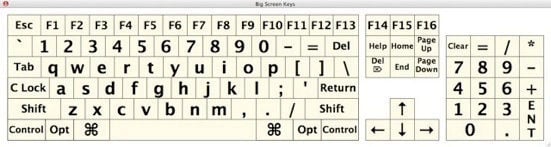
Big Screen Keys is an on-screen virtual keyboard designed to help individuals who find using a keyboard difficult or impossible. By clicking the on-screen keyboard keys, Big Screen Keys will type to the active window. Big Screen Keys can also be resized to quickly adjust to the user’s needs.
When using Big Screen Keys please make sure that the caps-lock, on the computer’s keyboard, is turned off. This will prevent the caps-lock from making Big Screen Keys type in all caps.
Cost: FREE
Big Screen Keys is freeware. Anyone can use it without charge. We are working for tips. If you use this program frequently, please consider sending a few dollars to help us maintain our programs and site. If this program is being used in a commercial situation then, please send several dollars per copy. Contributions can be done quickly and securely by clicking on the button below. We hope, that in the future, we will have enough money to create educational tools full-time. Thank you for your support.
Download: By downloading this program, you agree to the EULA
Please link to our site, instead of distributing our program. Thank You.
ScreenShot:

System Requirements:
Mac OS 10.2.x - 10.6.x
PowerPC G3 233 MHz CPU or Intel CPU
128 MB RAM
20 MB Free Hard Drive Space
640x480 Screen Resolution
Speakers
Manual:
Video Tutorial:
Big Screen Keys Interface Tutorial (3:20)
If Blip.tv is blocked by a web filter, please try our video on TeacherTube at:
www.teachertube.com/view_video.php?viewkey=0057b915265fb8fccbe3
What’s New With Big Screen Keys:
6/9/08 Big Screen Keys Interface Tutorial video TeacherTube link added
4/10/08 Big Screen Keys Interface Tutorial video YouTube link added